Mac mini M6 guide
Mac mini M6 Specs: Price, Release Date, and AI Guide
Mac mini M6 is the compact entry point in Apple's 2026 desktop refresh. It is a strong fit for everyday work and lighter local AI when its starting memory and storage match your needs.
Short answer
Choose Mac mini M6 when you want a compact primary desktop, ordinary productivity, light creative work, or small local models. Do not choose it just for the M6 name if your real problem is storage capacity, software compatibility, or a workload that needs more memory.
Mac mini M6 starting point
Mac mini M6 is one option in a four-machine desktop release. The starting figures below are the configuration used by this advisor’s catalog; configurable ceilings can be higher, and local price or availability must be checked in your market.
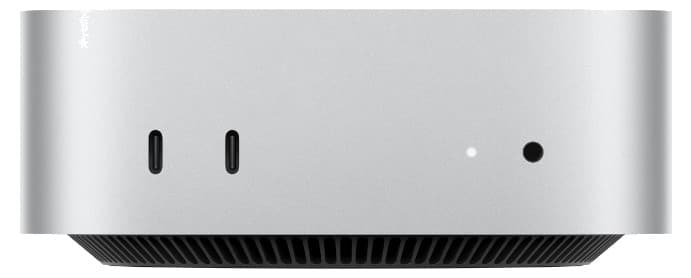
| Field | Starting configuration | Why it matters |
|---|---|---|
| Unified memory | 16GB (configurable to 32GB) | Sets the headroom for apps, model weights, context, and concurrent work. Capacity is the hard gate for local models. |
| Memory bandwidth | 153GB/s (170GB/s at higher memory tiers) | Set by the chip tier, not by how many GB you buy — it decides local-model token generation speed once the model fits. |
| SSD | 256GB | Holds applications, projects, caches, and local model files. Capacity is not the same as speed. |
| CPU / GPU | 12-core CPU · 12-core GPU | Useful only when the workload is actually CPU- or GPU-bound. |
| U.S. starting price | US$899 | Apple's launch price for the starting configuration. Education pricing, tax, memory, storage, and regional prices differ. |
| Availability | Pre-order from August 25, 2026; available from September 22, 2026 | Availability and delivery dates can vary by configuration and market. |
| Best first question | Everyday work, browsing, office apps, and a compact home setup. | |
Mac mini M6 specs, price, and release date
Apple announced Mac mini M6 on August 25, 2026. The U.S. model starts at $899 with a 12-core CPU, 12-core GPU, 16GB of unified memory, and a 256GB SSD. Pre-orders opened August 25, and Apple says availability begins September 22. A 24GB or 32GB memory configuration raises memory bandwidth from 153GB/s to 170GB/s.
| Launch fact | Mac mini M6 | Decision impact |
|---|---|---|
| U.S. starting price | $899 | Compare the complete memory and storage configuration, not only the base price. |
| Order / availability | Pre-order August 25 · available September 22, 2026 | Wait for independent tests if your purchase depends on a specific app or local-model result. |
| Starting hardware | 12-core CPU · 12-core GPU · 16GB memory · 256GB SSD | The 256GB drive is a capacity limit even when the chip is faster. |
| Memory tiers | 16GB at 153GB/s · 24GB or 32GB at 170GB/s | 32GB is the ceiling, so larger models and long-context agents may need M5 Pro or Mac Studio. |
Mac mini M6 vs M5 Pro: which constraint changes?
M6 is the lower-cost choice for ordinary productivity, lighter development, and local models that fit within 32GB. M5 Pro starts at $1,699 and raises the memory ceiling to 64GB, with 307GB/s bandwidth and Thunderbolt 5. Choose M5 Pro only when your build, creative, I/O, or local AI workload uses that extra envelope.
Read the full Mac mini M6 vs M5 Pro comparison for the price, memory, development, video, and local AI decision matrix.
Mac mini M6 vs M4: is the upgrade worth it?
An M4 owner should upgrade only when M6 removes a measured limit. The same compact design and a faster generation do not repair a full SSD, incompatible software, a cloud-service bottleneck, or a memory requirement beyond the selected configuration. Keep M4 when it still completes the real task reliably.
Use the Mac mini M6 vs M4 upgrade guide to separate new features from a purchase-worthy bottleneck.
Is Mac mini M6 good for local AI?
Mac mini M6 is a practical entry point for small and moderate local models when model weights, context cache, runtime overhead, and other apps fit with headroom. Capacity comes first: a model that does not fit cannot benefit from a faster chip. After fit, bandwidth affects token generation, while GPU compute affects prompt processing and long-context work. See which models fit which Mac tier and the full Mac for local LLMs guide before ordering.
Why this model can make sense
- It keeps the desktop footprint small while adding a newer CPU and GPU generation.
- The starting configuration is easier to justify for office work, browsing, coding, and lighter creative projects.
- It can be a sensible first step into local AI when the model, context, and concurrency fit the available memory.
What it will not solve by itself
- The starting storage is still a finite capacity. A faster drive does not create more space for projects or model files.
- It cannot make a Windows-only application, game, CUDA dependency, or plug-in compatible with macOS.
- Apple's named AI and graphics improvements are workload-specific tests, not a guarantee for every application.
Best for
- Everyday work, browsing, office apps, and a compact home setup.
- Light coding, creative work, and one-user local AI experiments.
- Buyers who want room to keep external storage or change configuration later.
Consider a different model when
- Large local models, long context, or many concurrent agents that exceed its memory envelope.
- Sustained high-end GPU work, large video projects, or specialist display and I/O requirements.
- A Windows switch where a required application has not passed a compatibility check.
The Apple newsroom release is the primary source for its named workload tests. The technical specifications describe the product and configurable options. Neither source is a substitute for an independent, like-for-like benchmark of your exact application.
Continue the decision
- Mac mini M6 vs M5 ProCompare price, memory, bandwidth, development, and local AI.
- Mac mini M6 vs M4Decide whether an existing M4 bottleneck justifies an upgrade.
- Mac mini vs Mac StudioCompare all four current desktop configurations.
- Mac mini M5 ProSee the wider buying context before choosing.
- Run the free advisorUse your own device, workload, budget, and compatibility details.
Questions people ask
Clear answers before you buy
What are the Mac mini M6 price and release date?
Apple announced a U.S. starting price of $899. Pre-orders opened August 25, 2026, with customer deliveries and store availability beginning September 22, 2026.
Is Mac mini M6 worth upgrading from M4?
Only when the M6 removes a bottleneck you can name. Check storage, memory, compatibility, and the actual workload before treating CPU or GPU gains as a reason to buy.
Can Mac mini M6 run local LLMs?
It can run local models that fit its memory and runtime requirements. Model size, quantization, context, and concurrency matter more than the chip name alone.
Who should not buy the base Mac mini M6?
Do not choose the base configuration when your current limit is storage capacity, memory pressure, large local models, sustained GPU work, or a Windows-only workflow.
Use your own baseline
Get a free recommendation for your actual bottleneck.
The advisor asks for the hardware, workload, budget, and compatibility details that generic buying guides cannot see.
Keep or Upgrade is an independent decision-support tool. Apple product names identify the products being compared; Apple does not sponsor or endorse this site. Specifications and vendor test claims can change, so confirm local availability, pricing, and compatibility before purchasing.